Top cybersecurity habits for digital lifestyle lay the foundation for a secure digital existence, shedding light on the critical need for safeguarding our online activities. From understanding prevalent threats to exploring recent cyber attacks, this topic delves into the essentials of cybersecurity in today's interconnected world.
Top cybersecurity habits for digital lifestyle
In today's digital age, cybersecurity plays a crucial role in safeguarding our personal information and assets from malicious threats. With the increasing reliance on technology for various aspects of our lives, it is essential to adopt good cybersecurity habits to protect ourselves in the digital realm.
Identifying common threats in the digital world
- Phishing attacks: Cybercriminals use deceptive emails or messages to trick individuals into revealing sensitive information.
- Malware: Malicious software designed to disrupt, damage, or gain unauthorized access to computer systems.
- Ransomware: A type of malware that encrypts files on a victim's computer and demands payment for decryption.
Examples of recent cyber attacks
Recent cyber attacks serve as stark reminders of the importance of cybersecurity. For instance, the ransomware attack on Colonial Pipeline in 2021 disrupted fuel supply in the United States, highlighting the significant impact cyber threats can have on critical infrastructure.
Regular Software Updates
Regularly updating software is crucial for maintaining cybersecurity in your digital lifestyle. Software updates often include patches for security vulnerabilities, which help protect your devices from potential cyber threats.Enabling automatic updates on different devices can ensure that you always have the latest security patches installed.
Here are steps to enable automatic updates on common devices:
Steps to Enable Automatic Updates
- For Windows PC:
- Go to Settings > Update & Security.
- Click on Windows Update.
- Toggle on "Automatically download updates."
- For Mac:
- Go to System Preferences > Software Update.
- Check the box for "Automatically keep my Mac up to date."
- For Android:
- Open Google Play Store app.
- Tap on Menu > Settings.
- Enable "Auto-update apps."
- For iOS:
- Go to Settings > General > Software Update.
- Turn on "Automatic Updates."
Regular software updates significantly reduce the risks associated with using outdated software. Outdated software may contain known vulnerabilities that hackers can exploit to gain unauthorized access to your devices or personal information. By keeping your software up to date, you can stay ahead of potential cyber threats and protect your digital assets effectively.
Strong Password Management
Strong password management is crucial in maintaining the security of your digital accounts and personal information. By creating and using secure passwords, you can prevent unauthorized access and protect yourself from cyber threats.
Tips for Creating Secure Passwords
- Include a mix of uppercase and lowercase letters, numbers, and special characters in your passwords.
- Avoid using easily guessable information like your name, birthdate, or common words.
- Make your passwords at least 12-15 characters long to increase their complexity.
- Consider using passphrases, which are longer phrases made up of random words that are easier to remember.
- Create unique passwords for each of your accounts to prevent a single breach from compromising all your accounts.
Password Managers and Their Benefits
Password managers are tools that store and manage all your passwords in an encrypted digital vault. They offer the following benefits:
- Convenience: Password managers can automatically fill in your login information, saving you time.
- Stronger Security: By generating complex, unique passwords for each account, password managers enhance your overall security.
- Encrypted Storage: Password managers encrypt your data, ensuring that only you can access it.
- Multi-Device Sync: You can access your passwords across multiple devices, making it easier to stay secure.
Two-Factor Authentication (2FA)
Two-factor authentication (2FA) is an added layer of security that requires not only a password and username but also something that only the user has on them, such as a piece of information only they should know or something that is unique to them.
This significantly enhances security by making it more difficult for unauthorized users to access an account.
Examples of Platforms Offering 2FA
- Google: Offers 2FA through Google Authenticator or SMS verification.
- Facebook: Provides 2FA through security keys, authentication apps, or SMS.
- Apple: Allows users to set up 2FA for their Apple ID for added security.
- Microsoft: Offers 2FA options for various Microsoft accounts, including Outlook and OneDrive.
Setting Up 2FA on Various Accounts
Setting up 2FA on different accounts generally involves the following steps:
- Log in to your account and navigate to the security settings.
- Locate the 2FA or Two-Step Verification option and select it.
- Choose the method you prefer for receiving authentication codes (such as SMS, email, or authentication app).
- Follow the on-screen instructions to complete the setup process, which may include scanning a QR code or entering a verification code.
- Once set up, you will need to input the additional code sent to you whenever you log in to your account, in addition to your password.
Phishing Awareness
Phishing is a type of cyber attack where scammers send fake emails or messages to trick individuals into revealing sensitive information, such as passwords, credit card numbers, or personal details. It poses a serious threat to cybersecurity as it can lead to identity theft, financial loss, or unauthorized access to accounts.
Common Red Flags
- Urgent or threatening language in the message, pressuring you to act quickly.
- Unsolicited emails asking for personal or financial information.
- Spelling and grammatical errors in the message, indicating a lack of professionalism.
- Links or attachments in the email that seem suspicious or lead to unfamiliar websites.
Tips to Avoid Phishing Scams
- Avoid clicking on links or downloading attachments from unknown or suspicious emails.
- Double-check the sender's email address to ensure it matches the official contact information of the organization.
- Never provide sensitive information through email, especially if you did not initiate the communication.
- Use security software and tools to detect and block phishing attempts automatically.
Last Recap
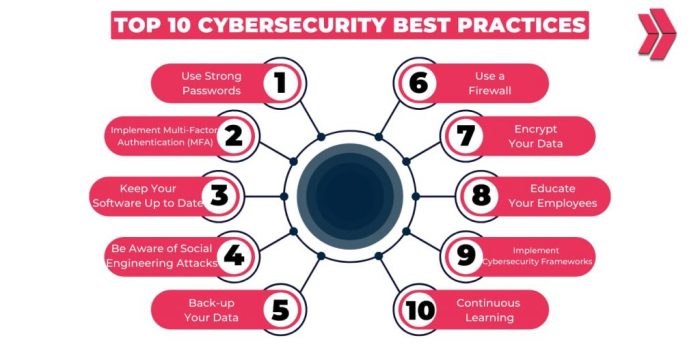
In conclusion, adopting top cybersecurity habits for digital lifestyle is paramount in fortifying your online security. By staying vigilant, updating software regularly, managing passwords effectively, embracing two-factor authentication, and honing phishing awareness, you can navigate the digital realm with confidence and resilience.
Stay safe, stay secure.
FAQ Guide
What is the importance of updating software for cybersecurity?
Regular software updates help patch vulnerabilities and strengthen the security of your devices, safeguarding them against potential cyber threats.
How can I create strong passwords?
To create strong passwords, use a combination of uppercase and lowercase letters, numbers, and special characters. Avoid using easily guessable information like birthdays or pet names.
What is two-factor authentication (2FA) and why is it important?
Two-factor authentication adds an extra layer of security by requiring a second form of verification beyond just a password, such as a code sent to your phone. This significantly reduces the risk of unauthorized access to your accounts.
How can I identify phishing attempts?
Look out for suspicious emails asking for personal information, urgent action, or containing unfamiliar links. Check for spelling errors or odd sender addresses, as these are common signs of phishing attempts.