In today's fast-paced digital world, staying organized is key to maximizing productivity and reducing stress. Whether it's managing files, emails, or digital devices, having a solid organizational system in place can make a world of difference. Let's dive into the realm of digital organization and explore effective strategies to streamline your digital life efficiently.
Setting Up Digital Organization System
Having a structured digital organization system is crucial in today's digital age to keep your files easily accessible and well-managed. Here are some tips and benefits to help you get started:
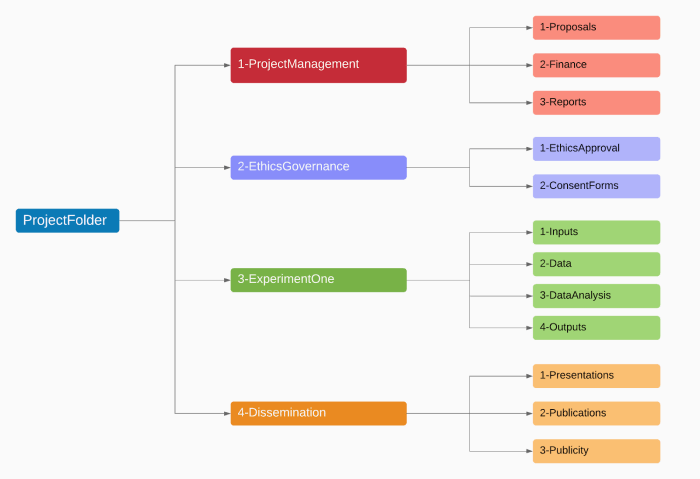
Creating Folders and Subfolders
Organizing your files into folders and subfolders based on categories such as work, personal, finances, and projects can help you quickly locate and retrieve specific files. For example, within your work folder, you can have subfolders for different clients or projects to maintain a clear hierarchy.
- Use descriptive folder names to easily identify the contents.
- Create subfolders within main folders to further categorize files.
- Regularly review and update your folder structure to ensure efficiency.
Benefits of Using Cloud Storage
Storing your digital files in cloud storage services like Google Drive, Dropbox, or OneDrive offers several advantages, including:
- Access files from any device with an internet connection.
- Automatic backup and sync to prevent data loss.
- Collaborate with others by sharing files and folders easily.
Digital Organization Tools and Software
There are various tools and software available to help you streamline your digital organization process, such as:
- Evernote: for note-taking and organizing ideas.
- Trello: for project management and task tracking.
- Microsoft OneNote: for creating digital notebooks and storing information.
Managing Email and Communication
Effectively managing your emails and communication is crucial for maintaining a productive digital life. By implementing strategies to organize your inbox and streamline your communication channels, you can save time and stay focused on important tasks.
Organizing Emails Efficiently
One of the first steps in managing your email is to declutter your inbox by unsubscribing from unnecessary newsletters and promotional emails. This will help reduce the volume of emails you receive and allow you to focus on essential messages.
- Create folders or labels to categorize your emails based on priority or topic. This will make it easier to locate specific emails when needed.
- Use filters to automatically sort incoming emails into the appropriate folders. Set rules based on sender, subject, or s to streamline your inbox.
- Regularly archive or delete old emails to prevent your inbox from becoming overcrowded. Keep only the emails that require action or reference.
Setting Up Filters and Labels
Filters and labels are powerful tools that can help you manage your inbox more efficiently. By setting up filters to automatically categorize incoming emails and applying labels to organize them, you can streamline your email workflow.
- Identify common types of emails you receive and create filters to sort them into specific folders. This will help prioritize your emails and ensure important messages are not missed.
- Use labels to tag emails with relevant s or categories. This will make it easier to search for specific emails and keep your inbox organized.
- Regularly review and update your filters and labels to adapt to changes in your communication patterns. This will help maintain an efficient email management system.
Email Management Tools
There are various email management tools available that can help streamline your email workflow and enhance your productivity. Consider using tools like:
- Google Workspace (formerly G Suite):Offers a suite of productivity tools, including Gmail, Calendar, and Drive, to help you manage your emails and tasks efficiently.
- Microsoft Outlook:Provides robust email management features, such as filters, folders, and categories, to help you stay organized and productive.
- Mailchimp:A popular email marketing platform that can help you create and schedule emails, manage subscriber lists, and track email performance.
Streamlining Digital Devices
When it comes to managing our digital lives, decluttering our devices regularly is essential for efficiency and productivity. By organizing apps, photos, and documents on smartphones and computers, we can create a streamlined digital workspace that helps us focus and find what we need quickly.
Organizing Apps, Photos, and Documents
One effective method for organizing apps is to group them into folders based on their function or category
- For photos, consider creating albums or folders to categorize them by events, dates, or themes. This not only declutters your photo library but also makes it easier to find and share specific photos.
- When it comes to documents, establish a clear folder structure on your computer to store files logically. Create main folders for different types of documents (e.g., work, personal, projects) and subfolders within them for further organization.
Benefits of Digital Decluttering Apps
- Digital decluttering apps, such as organization tools and file management software, can help automate the process of organizing and cleaning up your devices.
- These apps often provide features like duplicate file finders, disk cleanup tools, and storage optimization, making it easier to maintain a clutter-free digital environment.
- By using these apps, you can save time and effort in managing your digital files and ensure that your devices are running smoothly.
Tips for Creating a Streamlined Digital Workspace
- Regularly review and delete unused apps, photos, and documents to free up storage space and reduce clutter on your devices.
- Organize your desktop or home screen by keeping only essential apps and files visible, while storing the rest in folders for easy access.
- Utilize cloud storage services for backing up important files and photos, reducing the load on your devices and ensuring data security.
- Set aside dedicated time each week to declutter and organize your digital workspace, maintaining a clean and efficient environment for productivity.
Digital Calendar and Task Management
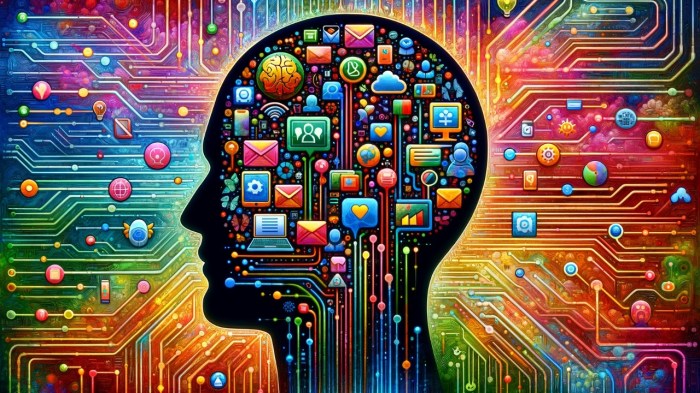
Using digital calendars for scheduling tasks and events can greatly improve efficiency and organization in your life. Here are some advantages of utilizing digital calendars:
Setting Reminders and Notifications
- Setting reminders for important events or tasks helps ensure that nothing slips through the cracks. You can receive notifications on your phone or computer to keep you on track.
- Notifications can be customized to alert you at specific times or intervals before the event, allowing you to prepare accordingly.
- By using reminders and notifications, you can avoid missing deadlines or forgetting about important appointments.
Integrating Task Management Tools
- Integrating task management tools with calendars allows you to see your schedule and tasks in one place, providing a holistic view of your commitments.
- You can easily allocate time slots for specific tasks within your calendar, helping you prioritize and manage your workload effectively.
- Task management tools often come with features such as categorizing tasks, setting priorities, and tracking progress, enhancing your productivity and organization.
Popular Digital Calendar and Task Management Applications
- Google Calendar: A widely used digital calendar that allows you to schedule events, set reminders, and sync across devices for easy access.
- Microsoft Outlook: Offers calendar and task management functionalities, along with email integration, making it a comprehensive tool for organizing your digital life.
- Todoist: A popular task management application that can be integrated with calendars, providing a seamless way to manage tasks and schedule them within your calendar.
- Apple Calendar: Ideal for Apple users, this app syncs across all Apple devices and offers features like shared calendars and color-coding for better organization.
Ultimate Conclusion
As we wrap up our discussion on organizing your digital life efficiently, remember that a clutter-free digital space can lead to a clearer mind and increased efficiency. By implementing the tips and tools shared in this guide, you'll be well on your way to a more organized and productive digital life.
User Queries
How often should I declutter my digital devices?
It's recommended to declutter your devices at least once a month to ensure optimal performance and organization.
Are there any free email management tools available?
Yes, there are several free email management tools like Thunderbird and Mailbird that offer efficient email organization features.
What are some popular digital decluttering apps?
Apps like CCleaner, CleanMyPC, and AppCleaner are widely used for digital decluttering and optimizing device performance.